Showing posts with label Tutorials and Tricks. Show all posts

Friday, July 18, 2008

IIS 6 Fix for UrlRewriter.Net

Make sure you add a Wildcard application maps entry under Application Configuration for UrlRewriter.Net to work without file extensions, e.g. http://localhost/show/users.

Wednesday, December 12, 2007

ASP.NET ViewState Helper

From BinaryFortressSoftware:

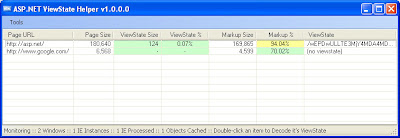
ASP.NET ViewState Helper is designed to help all web developers, but has specific features to help ASP.NET developers track ViewState issues. Analyze your web pages in real-time while you browse them using Internet Explorer 6.0 or higher. As you can see in this Screen Shot, ASP.NET ViewState Helper gives you very detailed information to help you optimize your web application’s performance. ASP.NET ViewState Helper allows you to see the following details about each page:


  • Page’s total size: This is the total size of the web page shown in the URL column

  • ViewState size: This is the size of the ViewState field

  • ViewState %: What percent of the total page size is being taken up by the ViewState?

  • Markup size: The size of HTML markup (non-visible text) on the page

  • Markup %: What percent of the page consists of non-visible HTML markup?


Softpedia 100% Clean Award

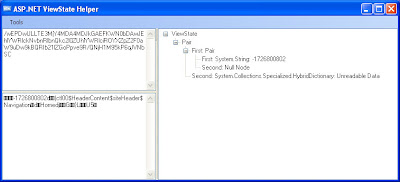
Double-clicking on any URL in the list will bring up the ViewState Decoder window. If the page you double-clicked on contains a ViewState, it will be decoded into plain text, and also broken down into a tree-view for easy analysis.


No wonder Google loads so fast! :)

Saturday, December 8, 2007

Windows Server 2003 Tips

SQL Server databases not supported on compressed volumes. Read more.

Thursday, December 6, 2007

Setting up Local Network with Windows Server 2003

I recently set up a local network with Windows Server 2003. Microsoft has a really good 2-part tutorial on how to set one up called Step-by-Step Guide to a Common Infrastructure for Windows Server 2003 Deployment.

This document is the first in a series of step by step guides explaining how to build a common network infrastructure for deployment of the Microsoft WindowsServer 2003 operating system. Subsequent guides build upon this base infrastructure by detailing the configuration of common customer use scenarios. This guide begins with the installation of the Windows Server 2003 operating system and Active Directory.


Part 1: Installing Windows Server 2003 as a Domain Controller

Part 2: Installing a Windows XP Professional Workstation and Connecting It to a Domain

Thursday, October 18, 2007

Alt + PrintScreen

I love the PrintScreen button, but now I love it even more. I've just learned you can use Alt + PrintScreen to capture only the active window. Isn't it awesome? :)

Tuesday, August 14, 2007

Create a Transparent Image using Adobe Photoshop

I've finally learned how to create a transparent image using Adobe Photoshop. As you can see the new Dealyzer logo is now transparent. :D

Dealyzer Logo

Thanks to Vishah for putting it together.

Source: http://www.axialis.com/tutorials/tutorial-misc001.html

Sunday, May 13, 2007

Development Notes

Problem: Drop Failed for User - Error MSSQLSERVER 15421 / The database principal owns a database role and cannot be dropped. Msg 15421.
Solution: http://blog.davestechshop.net/archive/2006/10/05/DropFailedForUserMsg15421.aspx

Problem: Why Don't I See a Security Tab on the Properties dialog for My Files and Folders in Windows XP?
Solution: http://imar.spaanjaars.com/QuickDocId.aspx?quickdoc=286

Thursday, March 29, 2007

MSDTC Not Installed on New Dell Computers

I had this issue when I ran IIS for the first time:

The server failed to load application '/LM/W3SVC/1/ROOT'. The error was 'Class not registered'.


The problem was Dell did not install the MSDTC, which is the Microsoft Distributed Transaction Coordinator, and I found the solution at http://forums.microsoft.com/MSDN/ShowPost.aspx?PostID=881749&SiteID=1.

Basically here are the steps that I took to fix it:


  1. Run msdtc - install in c:\windows\system32 using the command prompt

  2. Uninstall and reinstall IIS

Tuesday, January 9, 2007

Flash and Javascript

A useful function to interact with Flash movie with Javascript. Works in most browsers. Thanks Permadi.com! :)

function getFlashMovieObject(movieName)
{
if (window.document[movieName])
{
return window.document[movieName];
}
if (navigator.appName.indexOf("Microsoft Internet")==-1)
{
if (document.embeds && document.embeds[movieName])
return document.embeds[movieName];
}
else // if (navigator.appName.indexOf("Microsoft Internet")!=-1)
{
return document.getElementById(movieName);
}
}

Monday, January 8, 2007

Cross-Browser getElementById()

A useful Javascript function to return the ID of an element that is supposed to work on most browsers.Thanks Netlobo.com! :)

function returnObjById( id )
{
if (document.getElementById)
var returnVar = document.getElementById(id);
else if (document.all)
var returnVar = document.all[id];
else if (document.layers)
var returnVar = document.layers[id];
return returnVar;
}

Saturday, May 6, 2006

Java Collections in j2sdk-1_4_2


  Implementations
Hash Table Resizable Array Balanced Tree Linked List Hash Table + Linked List
Interfaces Set HashSet   TreeSet   LinkedHashSet
List   ArrayList   LinkedList  
Map HashMap   TreeMap   LinkedHashMap


Wednesday, April 5, 2006

Got Atlas Installed for Viual Studio 2005 and .NET 2.0

Atlas is a free framework for building a new generation of richer, more interactive, highly personalized standards based Web applications. It works with VS 2005 and .NET 2.0.

I'm excited to have it installed last night. Played around with it for a bit and also started a new project to learn more about the new Atlas framework and AJAX.

Here are some advantages of the new Atlas framework:

  • Atlas empowers ASP.NET developers to effortlessly create richer web experiences.

  • Atlas includes a client-side Javascript framework for easy script creation and reuse.

  • Atlas makes it super easy to consume services from ASP.NET.

  • Atlas makes building composite applications from the programmable web a snap.


You can learn more about the new Atlas framework at atlas.asp.net.

Tuesday, March 28, 2006

What is a MS SQL Server Trigger?

A trigger is an object contained within a SQL Server database that gets called each time a row in a table is INSERTED, DELETED, or UPDATED. It is used to execute a batch of SQL code whenever one of these SQL commands, INSERT, UPDATE, or DELETE, is executed against a specific table.

Trigger is stored in the database and can be accessed from any client or web page that connects to the database. If used correctly, trigger can save developers a large amount of time and work.

CREATE TRIGGER trigger_name

ON { table | view }

[ WITH ENCRYPTION ]

{

{ { FOR | AFTER | INSTEAD OF } { [ INSERT ] [ , ] [ UPDATE ] [ , ] [ DELETE ] }

[ WITH APPEND ]

[ NOT FOR REPLICATION ]

AS

[ { IF UPDATE ( column )

[ { AND | OR } UPDATE ( column ) ]

[ ...n ]

| IF ( COLUMNS_UPDATED ( ) { bitwise_operator } updated_bitmask )

{ comparison_operator } column_bitmask [ ...n ]

} ]

sql_statement [ ...n ]

}

}

Example:

CREATE TRIGGER trig_addAuthor

ON authors

FOR INSERT

AS

-- Get the first and last name of new author

DECLARE @newName VARCHAR(100)

SELECT @newName = (SELECT au_fName + ' ' + au_lName FROM Inserted)

-- Print the name of the new author

PRINT 'New author "' + @newName + '" added.'

Read more on this at www.devarticles.com.

Monday, March 20, 2006

My Very First AJAX Application

The application shows how the XMLHttpRequest object or the Microsoft.XMLHTTP ActiveX object is used to load and display a simple text file in the browser.

Check it out here.

Wednesday, March 15, 2006

Display and Hide DIVs Using Javascript and CSS

Suppose I have some text within <div id="div1"></div> tags, it's easy to display and hide this block of text with the help of some Javascript code and CSS.

To hide the block of text, do the following:

<script language="javascript">
document.getElementById('div1').style.display = 'none';
</script>

To display the block of text, just remove the word 'none' from the code above as follows:

<script language="javascript">
document.getElementById('div1').style.display = '';
</script>

To further extend this capability, we can put the code above in a Javascript function, which can be called using the OnClick event. This can be easily done with a form checkbox as follows:

<input type="checkbox" id="CheckBoxID" OnClick="ShowHideDIV();">

function ShowHideDIV()
{
var blnCheckbox = document.getElementById('CheckBoxID')
if(blnCheckbox.checked)
{
document.getElementById('div1').style.display = 'none';
}
else
{
document.getElementById('div1').style.display = '';
}
}

Tuesday, February 28, 2006

Javascript to disable user from using the browser’s Back button

The following Javascript code would disable the user from using the browser's Back button.

<script language="javascript">
window.history.forward(1);
</script>

Wednesday, February 15, 2006

Bloch’s Standard Exceptions

IllegalArgumentException: Parameter value is inappropriate

NullPointerException: Parameter null where prohibited

IndexOutOfBoundsException: Index param out of range

ConcurrentModificationException: Concurrent modification detected when not allowed

IllegalStateException: Object state is inappropriate for method invocation. Ojbect may not be initialized before accessing its state. ClassCastException (Illegal state of object)

UnsupportedOperationException: Object does not support the method. Substitutional principal

Tuesday, February 7, 2006

Top Ten Mistakes in Web Design


  1. Bad Search

  2. PDF Files for Online Reading

  3. Not Changing the Color of Visited Links

  4. Non-Scannable Text

  5. Fixed Font Size

  6. Page Titles With Low Search Engine Visibility

  7. Anything That Looks Like an Advertisement

  8. Violating Design Conventions

  9. Opening New Browser Windows

  10. Not Answering Users' Questions


Read more at Jakob Nielsen's Alertbox.
[Source: Jakob Nielsen's Alertbox]

Thursday, January 26, 2006

XSLT Operations

<xsl:when test="ceiling(number($variable1) div number($variable2)) = 2">

You can perform the following operations on XSLT variables:

ceiling($variable): returns the smallest integer greater than or equal to $variable
number($variable): casts $variable to a number
div: performs division operation

Tuesday, January 17, 2006

QuickNote - Firefox Extension

I've just downloaded another Firefox extension called QuickNote. It allows me to take note from within Firefox. I can open it in a seperate window, a new tab, or a sidebar. As a web developer, I tend to switch between NotePad and Firefox a lot but not anymore. Thanks to QuickNote. This extension is my new favorite. You should give it a try too. Download it here. Let me know what you think.